- Sep 13 Sat 2014 14:31
-
ORA-19502: write error on file "/oradata/ignt/ignite_egvsql01_d02.dbf", block number 334080 (block size=8192) & ORA-27072
- Sep 13 Sat 2014 14:31
-
ORA-01950: no privileges on tablespace 'USERS'錯誤解決方法
SQL> create user lxy identified by lxy default tablespace users;
User created.
SQL> grant create session,alter session,create table,create view,
2 create synonym,create cluster,create database link,create sequence,
User created.
SQL> grant create session,alter session,create table,create view,
2 create synonym,create cluster,create database link,create sequence,
- Sep 13 Sat 2014 14:30
-
LGWR CHECKPOINT時機
- Sep 13 Sat 2014 14:28
-
FRA 2G滿了 加到8G
oracle10g的 archive log是保存在flash area(FRA)中的,如果你在建立資料庫是使用預設,那flash area是2G,空間滿了後就無法archive了
- Sep 13 Sat 2014 14:26
-
查看表中commit資料的scn 並回復
http://blog.roodo.com/mywork/archives/1684525.html
有關scn值就是記錄在這個table裡
有關scn值就是記錄在這個table裡
SQL> desc flashback_transaction_query;
Name Type Nullable Default Comments
---------------- -------------- -------- ------- -----------------------------------------
XID RAW(8) Y Transaction identifier
START_SCN NUMBER Y Transaction start SCN
START_TIMESTAMP DATE Y Transaction start timestamp
COMMIT_SCN NUMBER Y Transaction commit SCN
COMMIT_TIMESTAMP DATE Y Transaction commit timestamp
LOGON_USER VARCHAR2(30) Y Logon user for transaction
UNDO_CHANGE# NUMBER Y 1-based undo change number
OPERATION VARCHAR2(32) Y forward operation for this undo
TABLE_NAME VARCHAR2(256) Y table name to which this undo applies
TABLE_OWNER VARCHAR2(32) Y owner of table to which this undo applies
ROW_ID VARCHAR2(19) Y rowid to which this undo applies
UNDO_SQL VARCHAR2(4000) Y SQL corresponding to this undo
- Sep 13 Sat 2014 14:22
-
多種非完整復原方法&基於SCN回復
http://blog.csdn.net/leshami/article/details/9253867
-->创建测试用表并插入记录
10:07:01 SQL> create table t2(id varchar2(10), dt varchar2(20));
10:07:57 SQL> insert into t2 select 'Robinson',to_char(sysdate,'yyyymmdd hh24:mi:ss') from dual;
10:08:15 SQL> commit;
10:08:18 SQL> alter system archive log current; -->对当前日志进行归档
-->下面的查询可知产生新的归档日志29
10:08:28 SQL> SELECT name,sequence# seq#,status,completion_time FROM v$archived_log where sequence#>=28;
NAME SEQ# S COMPLETION_TIME
------------------------------------------------------------ ---- - -----------------
/u02/DB/oradb/arch/2013_07_05/o1_mf_1_28_8xdbcrht_.arc 28 A 20130705 10:03:36
/u02/DB/oradb/arch/2013_07_05/o1_mf_1_29_8xdbnqx9_.arc 29 A 20130705 10:08:23
-->应证归档日志中包含记录Robinson
10:09:53 SQL> ho strings /u02/DB/oradb/arch/2013_07_05/o1_mf_1_29_8xdbnqx9_.arc | grep "Robinson"
Robinson
--->第二次插入记录
10:10:48 SQL> insert into t2 select 'Jackson',to_char(sysdate,'yyyymmdd hh24:mi:ss') from dual;
10:11:27 SQL> commit;
10:11:30 SQL> alter system archive log current;
10:11:47 SQL> SELECT name,sequence# seq#,status,completion_time FROM v$archived_log where sequence#>=28;
NAME SEQ# S COMPLETION_TIME
---------------------------------------------------------- ---- - -----------------
/u02/DB/oradb/arch/2013_07_05/o1_mf_1_28_8xdbcrht_.arc 28 A 20130705 10:03:36
/u02/DB/oradb/arch/2013_07_05/o1_mf_1_29_8xdbnqx9_.arc 29 A 20130705 10:08:23
/u02/DB/oradb/arch/2013_07_05/o1_mf_1_30_8xdbv338_.arc 30 A 20130705 10:11:47
10:12:17 SQL> ho strings /u02/DB/oradb/arch/2013_07_05/o1_mf_1_30_8xdbv338_.arc | grep "Jackson"
Jackson
-->查看当前数据库的SCN
10:12:34 SQL> select name,current_scn from v$database;
NAME CURRENT_SCN
------------------------------ -----------
ORADB 1365679
--->第三次插入记录
10:15:07 SQL> insert into t2 select 'Winson',to_char(sysdate,'yyyymmdd hh24:mi:ss') from dual;
10:15:47 SQL> commit;
10:21:18 SQL> alter system switch logfile;
--->第四次插入记录
10:22:53 SQL> insert into t2 select 'LastRecord',to_char(sysdate,'yyyymmdd hh24:mi:ss') from dual;
10:23:44 SQL> commit;
10:23:47 SQL> select * from t2;
ID DT
---------- --------------------
Robinson 20130705 10:08:15
Jackson 20130705 10:11:27
Winson 20130705 10:15:47
LastRecord 20130705 10:23:44
10:23:52 SQL> alter system switch logfile;
-->下面是最终的归档日志情况
10:24:00 SQL> SELECT name,sequence# seq#,status,completion_time FROM v$archived_log where sequence#>=28;
NAME SEQ# S COMPLETION_TIME
------------------------------------------------------------ ---- - -----------------
/u02/DB/oradb/arch/2013_07_05/o1_mf_1_28_8xdbcrht_.arc 28 A 20130705 10:03:36
/u02/DB/oradb/arch/2013_07_05/o1_mf_1_29_8xdbnqx9_.arc 29 A 20130705 10:08:23
/u02/DB/oradb/arch/2013_07_05/o1_mf_1_30_8xdbv338_.arc 30 A 20130705 10:11:47
/u02/DB/oradb/arch/2013_07_05/o1_mf_1_31_8xdcg1wc_.arc 31 A 20130705 10:21:53
/u02/DB/oradb/arch/2013_07_05/o1_mf_1_32_8xdcl0rx_.arc 32 A 20130705 10:24:00
10:24:12 SQL> ho strings /u02/DB/oradb/arch/2013_07_05/o1_mf_1_31_8xdcg1wc_.arc | grep "Winson"
Winson
--->最后一次插入记录
10:25:16 SQL> insert into t2 select 'Completed',to_char(sysdate,'yyyymmdd hh24:mi:ss') from dual;
10:26:20 SQL> commit;
-->此时数据库当前的redo log并没有归档,因此插入的数据位于联机日志
10:27:40 SQL> ho strings /u02/DB/oradb/redo/redo03.log | grep "Completed"
Completed
--->下面列出完成的记录与日志对照关系
SQL> select * from t2;
ID DT 对应的归档日志 对应的sequence
---------- -------------------- ------------------------ --------------
Robinson 20130705 10:08:15 o1_mf_1_29_8xdbnqx9_.arc 29
Jackson 20130705 10:11:27 o1_mf_1_30_8xdbv338_.arc 30
Winson 20130705 10:15:47 o1_mf_1_31_8xdcg1wc_.arc 31
LastRecord 20130705 10:23:44 o1_mf_1_32_8xdcl0rx_.arc 32
Completed 20130705 10:26:20 redo03.log
2、实施不完全恢复
a、基于时间点的不完全恢复
[oracle@node1 ~]$ rman target /
Recovery Manager: Release 11.2.0.1.0 - Production on Fri Jul 5 10:28:53 2013
Copyright (c) 1982, 2009, Oracle and/or its affiliates. All rights reserved.
connected to target database: ORADB (DBID=2557712192)
RMAN> run{
2> shutdown immediate;
3> startup mount;
4> set until time "to_date('20130705 10:09:53','yyyymmdd hh24:mi:ss')";
5> restore database;
6> recover database;
7> }
using target database control file instead of recovery catalog
database closed
database dismounted
Oracle instance shut down
connected to target database (not started)
Oracle instance started
database mounted
Total System Global Area 263639040 bytes
executing command: SET until clause
Starting restore at 20130705 10:33:36
allocated channel: ORA_DISK_1
channel ORA_DISK_1: SID=24 device type=DISK
channel ORA_DISK_1: starting datafile backup set restore ---->启动数据文件还原
channel ORA_DISK_1: specifying datafile(s) to restore from backup set
channel ORA_DISK_1: restoring datafile 00001 to /u02/DB/oradb/oradata/system01.dbf
channel ORA_DISK_1: restoring datafile 00003 to /u02/DB/oradb/oradata/undotbs01.dbf
channel ORA_DISK_1: reading from backup piece /u02/rman/full_ORADB_04odvgv7_1_1
channel ORA_DISK_1: piece handle=/u02/rman/full_ORADB_04odvgv7_1_1 tag=FULL_BAK
channel ORA_DISK_1: restored backup piece 1
channel ORA_DISK_1: restore complete, elapsed time: 00:01:05
channel ORA_DISK_1: starting datafile backup set restore
channel ORA_DISK_1: specifying datafile(s) to restore from backup set
channel ORA_DISK_1: restoring datafile 00002 to /u02/DB/oradb/oradata/sysaux01.dbf
channel ORA_DISK_1: restoring datafile 00004 to /u02/DB/oradb/oradata/users01.dbf
channel ORA_DISK_1: restoring datafile 00005 to /u02/DB/oradb/oradata/example01.dbf
channel ORA_DISK_1: reading from backup piece /u02/rman/full_ORADB_05odvgv7_1_1
channel ORA_DISK_1: piece handle=/u02/rman/full_ORADB_05odvgv7_1_1 tag=FULL_BAK
channel ORA_DISK_1: restored backup piece 1
channel ORA_DISK_1: restore complete, elapsed time: 00:00:45 --->完成数据文件还原
Finished restore at 20130705 10:35:28
Starting recover at 20130705 10:35:29 --->启动数据恢复
using channel ORA_DISK_1
starting media recovery
---->下面提示归档日志已经存在,是由于我们备份归档日志后并没有对其清除
archived log for thread 1 with sequence 27 is already on disk as file /u02/DB/oradb/arch/2013_07_05/o1_mf_1_27_8xd9c0f0_.arc
archived log for thread 1 with sequence 28 is already on disk as file /u02/DB/oradb/arch/2013_07_05/o1_mf_1_28_8xdbcrht_.arc
archived log for thread 1 with sequence 29 is already on disk as file /u02/DB/oradb/arch/2013_07_05/o1_mf_1_29_8xdbnqx9_.arc
archived log for thread 1 with sequence 30 is already on disk as file /u02/DB/oradb/arch/2013_07_05/o1_mf_1_30_8xdbv338_.arc
archived log file name=/u02/DB/oradb/arch/2013_07_05/o1_mf_1_27_8xd9c0f0_.arc thread=1 sequence=27 --->列出日志对应的sequence
archived log file name=/u02/DB/oradb/arch/2013_07_05/o1_mf_1_28_8xdbcrht_.arc thread=1 sequence=28
archived log file name=/u02/DB/oradb/arch/2013_07_05/o1_mf_1_29_8xdbnqx9_.arc thread=1 sequence=29
archived log file name=/u02/DB/oradb/arch/2013_07_05/o1_mf_1_30_8xdbv338_.arc thread=1 sequence=30
media recovery complete, elapsed time: 00:00:09 --->介质恢复完成,可以看到介质恢复,日志apply到了30(不包含sequence 30的内容)
Finished recover at 20130705 10:35:42 --->完成恢复
RMAN> alter database open resetlogs; --->手动open resetlogs
database opened
RMAN> host;
[oracle@node1 ~]$ more query_t2.sh
#!/bin/bash
if [ -f ~/.bashrc ]; then
. ~/.bashrc
fi
export ORACLE_SID=oradb
sqlplus -S /nolog <<EOF
connect scott/tiger
select * from scott.t2;
exit;
EOF
exit
-->验证结果,记录Robinson已经被恢复
[oracle@node1 ~]$ ./query_t2.sh
ID DT
---------- --------------------
Robinson 20130705 10:08:15
[oracle@node1 ~]$ exit
exit
host command complete
-->新的incarnation已经被产生,为3
RMAN> list incarnation;
List of Database Incarnations
DB Key Inc Key DB Name DB ID STATUS Reset SCN Reset Time
------- ------- -------- ---------------- --- ---------- ----------
1 1 ORADB 2557712192 PARENT 1 20090813 23:00:48
2 2 ORADB 2557712192 PARENT 754488 20130111 17:37:07
3 3 ORADB 2557712192 CURRENT 1365530 20130705 10:37:15
b、基于SCN的不完全恢复
RMAN> shutdown immediate;
RMAN> startup mount;
RMAN> reset database to incarnation 2; --->在此需要reset incarnation
database reset to incarnation 2
RMAN> run{
2> set until scn 1365679;
3> restore database;
4> recover database;
5> alter database open resetlogs;}
executing command: SET until clause
Starting restore at 20130705 11:01:14
allocated channel: ORA_DISK_1
channel ORA_DISK_1: SID=25 device type=DISK
channel ORA_DISK_1: starting datafile backup set restore
......................
channel ORA_DISK_1: restored backup piece 1
channel ORA_DISK_1: restore complete, elapsed time: 00:00:55
Finished restore at 20130705 11:03:05
Starting recover at 20130705 11:03:06
using channel ORA_DISK_1
starting media recovery
archived log for thread 1 with sequence 27 is already on disk as file /u02/DB/oradb/arch/2013_07_05/o1_mf_1_27_8xd9c0f0_.arc
.............................
archived log for thread 1 with sequence 31 is already on disk as file /u02/DB/oradb/arch/2013_07_05/o1_mf_1_31_8xdcg1wc_.arc
archived log file name=/u02/DB/oradb/arch/2013_07_05/o1_mf_1_27_8xd9c0f0_.arc thread=1 sequence=27
archived log file name=/u02/DB/oradb/arch/2013_07_05/o1_mf_1_28_8xdbcrht_.arc thread=1 sequence=28
archived log file name=/u02/DB/oradb/arch/2013_07_05/o1_mf_1_29_8xdbnqx9_.arc thread=1 sequence=29
archived log file name=/u02/DB/oradb/arch/2013_07_05/o1_mf_1_30_8xdbv338_.arc thread=1 sequence=30 --->该日志包含记录Jackson
archived log file name=/u02/DB/oradb/arch/2013_07_05/o1_mf_1_31_8xdcg1wc_.arc thread=1 sequence=31
media recovery complete, elapsed time: 00:00:10 --->此时apply到了31(不包含sequence 31的内容)
Finished recover at 20130705 11:03:19
database opened
RMAN> host;
-->验证结果,记录Jackson已经被恢复
[oracle@node1 ~]$ ./query_t2.sh
ID DT
---------- --------------------
Robinson 20130705 10:08:15
Jackson 20130705 10:11:27
-->创建测试用表并插入记录
10:07:01 SQL> create table t2(id varchar2(10), dt varchar2(20));
10:07:57 SQL> insert into t2 select 'Robinson',to_char(sysdate,'yyyymmdd hh24:mi:ss') from dual;
10:08:15 SQL> commit;
10:08:18 SQL> alter system archive log current; -->对当前日志进行归档
-->下面的查询可知产生新的归档日志29
10:08:28 SQL> SELECT name,sequence# seq#,status,completion_time FROM v$archived_log where sequence#>=28;
NAME SEQ# S COMPLETION_TIME
------------------------------------------------------------ ---- - -----------------
/u02/DB/oradb/arch/2013_07_05/o1_mf_1_28_8xdbcrht_.arc 28 A 20130705 10:03:36
/u02/DB/oradb/arch/2013_07_05/o1_mf_1_29_8xdbnqx9_.arc 29 A 20130705 10:08:23
-->应证归档日志中包含记录Robinson
10:09:53 SQL> ho strings /u02/DB/oradb/arch/2013_07_05/o1_mf_1_29_8xdbnqx9_.arc | grep "Robinson"
Robinson
--->第二次插入记录
10:10:48 SQL> insert into t2 select 'Jackson',to_char(sysdate,'yyyymmdd hh24:mi:ss') from dual;
10:11:27 SQL> commit;
10:11:30 SQL> alter system archive log current;
10:11:47 SQL> SELECT name,sequence# seq#,status,completion_time FROM v$archived_log where sequence#>=28;
NAME SEQ# S COMPLETION_TIME
---------------------------------------------------------- ---- - -----------------
/u02/DB/oradb/arch/2013_07_05/o1_mf_1_28_8xdbcrht_.arc 28 A 20130705 10:03:36
/u02/DB/oradb/arch/2013_07_05/o1_mf_1_29_8xdbnqx9_.arc 29 A 20130705 10:08:23
/u02/DB/oradb/arch/2013_07_05/o1_mf_1_30_8xdbv338_.arc 30 A 20130705 10:11:47
10:12:17 SQL> ho strings /u02/DB/oradb/arch/2013_07_05/o1_mf_1_30_8xdbv338_.arc | grep "Jackson"
Jackson
-->查看当前数据库的SCN
10:12:34 SQL> select name,current_scn from v$database;
NAME CURRENT_SCN
------------------------------ -----------
ORADB 1365679
--->第三次插入记录
10:15:07 SQL> insert into t2 select 'Winson',to_char(sysdate,'yyyymmdd hh24:mi:ss') from dual;
10:15:47 SQL> commit;
10:21:18 SQL> alter system switch logfile;
--->第四次插入记录
10:22:53 SQL> insert into t2 select 'LastRecord',to_char(sysdate,'yyyymmdd hh24:mi:ss') from dual;
10:23:44 SQL> commit;
10:23:47 SQL> select * from t2;
ID DT
---------- --------------------
Robinson 20130705 10:08:15
Jackson 20130705 10:11:27
Winson 20130705 10:15:47
LastRecord 20130705 10:23:44
10:23:52 SQL> alter system switch logfile;
-->下面是最终的归档日志情况
10:24:00 SQL> SELECT name,sequence# seq#,status,completion_time FROM v$archived_log where sequence#>=28;
NAME SEQ# S COMPLETION_TIME
------------------------------------------------------------ ---- - -----------------
/u02/DB/oradb/arch/2013_07_05/o1_mf_1_28_8xdbcrht_.arc 28 A 20130705 10:03:36
/u02/DB/oradb/arch/2013_07_05/o1_mf_1_29_8xdbnqx9_.arc 29 A 20130705 10:08:23
/u02/DB/oradb/arch/2013_07_05/o1_mf_1_30_8xdbv338_.arc 30 A 20130705 10:11:47
/u02/DB/oradb/arch/2013_07_05/o1_mf_1_31_8xdcg1wc_.arc 31 A 20130705 10:21:53
/u02/DB/oradb/arch/2013_07_05/o1_mf_1_32_8xdcl0rx_.arc 32 A 20130705 10:24:00
10:24:12 SQL> ho strings /u02/DB/oradb/arch/2013_07_05/o1_mf_1_31_8xdcg1wc_.arc | grep "Winson"
Winson
--->最后一次插入记录
10:25:16 SQL> insert into t2 select 'Completed',to_char(sysdate,'yyyymmdd hh24:mi:ss') from dual;
10:26:20 SQL> commit;
-->此时数据库当前的redo log并没有归档,因此插入的数据位于联机日志
10:27:40 SQL> ho strings /u02/DB/oradb/redo/redo03.log | grep "Completed"
Completed
--->下面列出完成的记录与日志对照关系
SQL> select * from t2;
ID DT 对应的归档日志 对应的sequence
---------- -------------------- ------------------------ --------------
Robinson 20130705 10:08:15 o1_mf_1_29_8xdbnqx9_.arc 29
Jackson 20130705 10:11:27 o1_mf_1_30_8xdbv338_.arc 30
Winson 20130705 10:15:47 o1_mf_1_31_8xdcg1wc_.arc 31
LastRecord 20130705 10:23:44 o1_mf_1_32_8xdcl0rx_.arc 32
Completed 20130705 10:26:20 redo03.log
2、实施不完全恢复
a、基于时间点的不完全恢复
[oracle@node1 ~]$ rman target /
Recovery Manager: Release 11.2.0.1.0 - Production on Fri Jul 5 10:28:53 2013
Copyright (c) 1982, 2009, Oracle and/or its affiliates. All rights reserved.
connected to target database: ORADB (DBID=2557712192)
RMAN> run{
2> shutdown immediate;
3> startup mount;
4> set until time "to_date('20130705 10:09:53','yyyymmdd hh24:mi:ss')";
5> restore database;
6> recover database;
7> }
using target database control file instead of recovery catalog
database closed
database dismounted
Oracle instance shut down
connected to target database (not started)
Oracle instance started
database mounted
Total System Global Area 263639040 bytes
executing command: SET until clause
Starting restore at 20130705 10:33:36
allocated channel: ORA_DISK_1
channel ORA_DISK_1: SID=24 device type=DISK
channel ORA_DISK_1: starting datafile backup set restore ---->启动数据文件还原
channel ORA_DISK_1: specifying datafile(s) to restore from backup set
channel ORA_DISK_1: restoring datafile 00001 to /u02/DB/oradb/oradata/system01.dbf
channel ORA_DISK_1: restoring datafile 00003 to /u02/DB/oradb/oradata/undotbs01.dbf
channel ORA_DISK_1: reading from backup piece /u02/rman/full_ORADB_04odvgv7_1_1
channel ORA_DISK_1: piece handle=/u02/rman/full_ORADB_04odvgv7_1_1 tag=FULL_BAK
channel ORA_DISK_1: restored backup piece 1
channel ORA_DISK_1: restore complete, elapsed time: 00:01:05
channel ORA_DISK_1: starting datafile backup set restore
channel ORA_DISK_1: specifying datafile(s) to restore from backup set
channel ORA_DISK_1: restoring datafile 00002 to /u02/DB/oradb/oradata/sysaux01.dbf
channel ORA_DISK_1: restoring datafile 00004 to /u02/DB/oradb/oradata/users01.dbf
channel ORA_DISK_1: restoring datafile 00005 to /u02/DB/oradb/oradata/example01.dbf
channel ORA_DISK_1: reading from backup piece /u02/rman/full_ORADB_05odvgv7_1_1
channel ORA_DISK_1: piece handle=/u02/rman/full_ORADB_05odvgv7_1_1 tag=FULL_BAK
channel ORA_DISK_1: restored backup piece 1
channel ORA_DISK_1: restore complete, elapsed time: 00:00:45 --->完成数据文件还原
Finished restore at 20130705 10:35:28
Starting recover at 20130705 10:35:29 --->启动数据恢复
using channel ORA_DISK_1
starting media recovery
---->下面提示归档日志已经存在,是由于我们备份归档日志后并没有对其清除
archived log for thread 1 with sequence 27 is already on disk as file /u02/DB/oradb/arch/2013_07_05/o1_mf_1_27_8xd9c0f0_.arc
archived log for thread 1 with sequence 28 is already on disk as file /u02/DB/oradb/arch/2013_07_05/o1_mf_1_28_8xdbcrht_.arc
archived log for thread 1 with sequence 29 is already on disk as file /u02/DB/oradb/arch/2013_07_05/o1_mf_1_29_8xdbnqx9_.arc
archived log for thread 1 with sequence 30 is already on disk as file /u02/DB/oradb/arch/2013_07_05/o1_mf_1_30_8xdbv338_.arc
archived log file name=/u02/DB/oradb/arch/2013_07_05/o1_mf_1_27_8xd9c0f0_.arc thread=1 sequence=27 --->列出日志对应的sequence
archived log file name=/u02/DB/oradb/arch/2013_07_05/o1_mf_1_28_8xdbcrht_.arc thread=1 sequence=28
archived log file name=/u02/DB/oradb/arch/2013_07_05/o1_mf_1_29_8xdbnqx9_.arc thread=1 sequence=29
archived log file name=/u02/DB/oradb/arch/2013_07_05/o1_mf_1_30_8xdbv338_.arc thread=1 sequence=30
media recovery complete, elapsed time: 00:00:09 --->介质恢复完成,可以看到介质恢复,日志apply到了30(不包含sequence 30的内容)
Finished recover at 20130705 10:35:42 --->完成恢复
RMAN> alter database open resetlogs; --->手动open resetlogs
database opened
RMAN> host;
[oracle@node1 ~]$ more query_t2.sh
#!/bin/bash
if [ -f ~/.bashrc ]; then
. ~/.bashrc
fi
export ORACLE_SID=oradb
sqlplus -S /nolog <<EOF
connect scott/tiger
select * from scott.t2;
exit;
EOF
exit
-->验证结果,记录Robinson已经被恢复
[oracle@node1 ~]$ ./query_t2.sh
ID DT
---------- --------------------
Robinson 20130705 10:08:15
[oracle@node1 ~]$ exit
exit
host command complete
-->新的incarnation已经被产生,为3
RMAN> list incarnation;
List of Database Incarnations
DB Key Inc Key DB Name DB ID STATUS Reset SCN Reset Time
------- ------- -------- ---------------- --- ---------- ----------
1 1 ORADB 2557712192 PARENT 1 20090813 23:00:48
2 2 ORADB 2557712192 PARENT 754488 20130111 17:37:07
3 3 ORADB 2557712192 CURRENT 1365530 20130705 10:37:15
b、基于SCN的不完全恢复
RMAN> shutdown immediate;
RMAN> startup mount;
RMAN> reset database to incarnation 2; --->在此需要reset incarnation
database reset to incarnation 2
RMAN> run{
2> set until scn 1365679;
3> restore database;
4> recover database;
5> alter database open resetlogs;}
executing command: SET until clause
Starting restore at 20130705 11:01:14
allocated channel: ORA_DISK_1
channel ORA_DISK_1: SID=25 device type=DISK
channel ORA_DISK_1: starting datafile backup set restore
......................
channel ORA_DISK_1: restored backup piece 1
channel ORA_DISK_1: restore complete, elapsed time: 00:00:55
Finished restore at 20130705 11:03:05
Starting recover at 20130705 11:03:06
using channel ORA_DISK_1
starting media recovery
archived log for thread 1 with sequence 27 is already on disk as file /u02/DB/oradb/arch/2013_07_05/o1_mf_1_27_8xd9c0f0_.arc
.............................
archived log for thread 1 with sequence 31 is already on disk as file /u02/DB/oradb/arch/2013_07_05/o1_mf_1_31_8xdcg1wc_.arc
archived log file name=/u02/DB/oradb/arch/2013_07_05/o1_mf_1_27_8xd9c0f0_.arc thread=1 sequence=27
archived log file name=/u02/DB/oradb/arch/2013_07_05/o1_mf_1_28_8xdbcrht_.arc thread=1 sequence=28
archived log file name=/u02/DB/oradb/arch/2013_07_05/o1_mf_1_29_8xdbnqx9_.arc thread=1 sequence=29
archived log file name=/u02/DB/oradb/arch/2013_07_05/o1_mf_1_30_8xdbv338_.arc thread=1 sequence=30 --->该日志包含记录Jackson
archived log file name=/u02/DB/oradb/arch/2013_07_05/o1_mf_1_31_8xdcg1wc_.arc thread=1 sequence=31
media recovery complete, elapsed time: 00:00:10 --->此时apply到了31(不包含sequence 31的内容)
Finished recover at 20130705 11:03:19
database opened
RMAN> host;
-->验证结果,记录Jackson已经被恢复
[oracle@node1 ~]$ ./query_t2.sh
ID DT
---------- --------------------
Robinson 20130705 10:08:15
Jackson 20130705 10:11:27
- Sep 13 Sat 2014 14:19
-
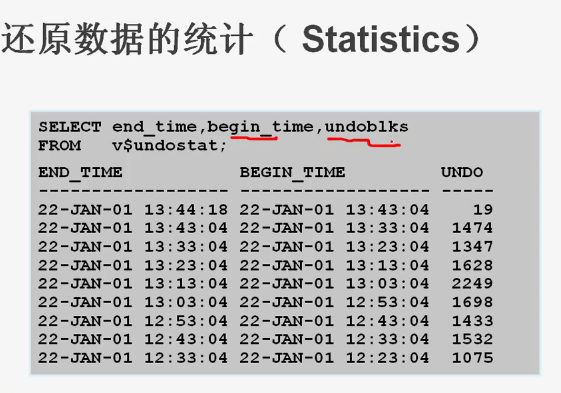
oracle系統介紹
http://kylinsoong.iteye.com/blog/776654
- Sep 13 Sat 2014 12:12
-
varchar2(10)和varchar2(4000)差異
如果定義varchar2(10)和varchar2(4000)存储最大10个字的内容,在数据库存储上區别不大,数据库效率也影響不大,但是会带来其它很多的问题,最影响应用的效率。
舉兩個出问题的例子:
1.如果你的表中存在多个varchar2(4000)的列,将导致不能创建符合index,创建时报ora-01450错误。
舉兩個出问题的例子:
1.如果你的表中存在多个varchar2(4000)的列,将导致不能创建符合index,创建时报ora-01450错误。
- Sep 13 Sat 2014 12:08
-
ORA-01940: 無法刪除目前已連接的用戶
